
Who this is for and what it does
Schedulers and Platform Admins use this when an interpreter can no longer do an appointment, or the client needs someone else.
Before you start
You need the Scheduler or Platform Admin role.
The appointment must not have started yet.
Steps
Unassign from one appointment
Open the appointment. In the Interpreters card, find the interpreter marked Confirmed and select Unassign.
In Unassign interpreter?, select Yes, Unassign.
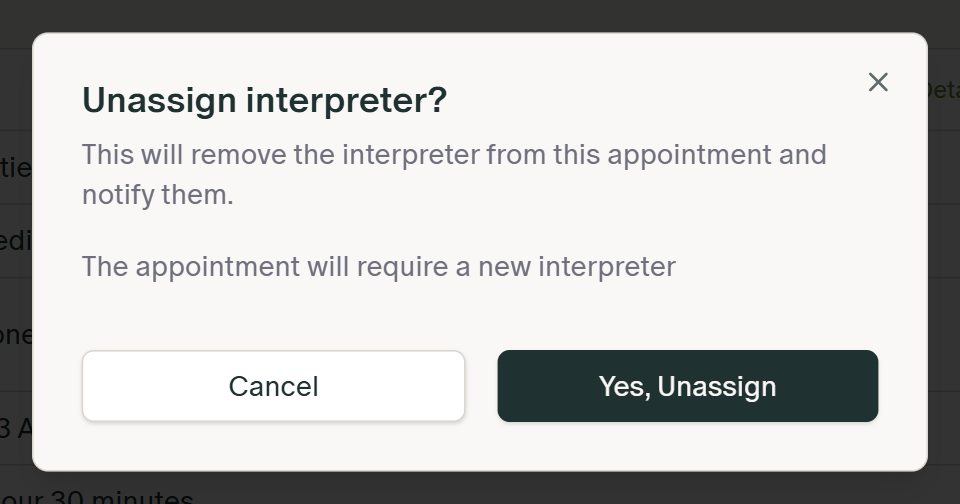
Replace them
After unassigning, assign the new interpreter. Select Assign on an invited interpreter's row, or invite new interpreters. See "Assign an interpreter to an appointment".
Reassign or unassign dates of a recurring series
Open the series and select the dates in the list.
Select Reassign, choose the new interpreter under New interpreter, and confirm with the Reassign button at the foot of the window. Or select Unassign all selected, then Yes, unassign.
What you will see
A message reads "Interpreter unassigned from appointment". The appointment shows Broadcasted again. Interpreters invited earlier show as Expired, and you can assign one of them again from their row. On an appointment with several interpreters, only that interpreter's place is offered again; the others stay.
Anything the interpreter had already submitted for closing out the job is removed.
For a series, a message reports how many dates were reassigned or unassigned, and how many were skipped. Dates that have started or finished are skipped.
Things that most often look wrong, and why:
There is no Unassign button. The appointment has started, or the interpreter is not confirmed on it.
"Cannot unassign interpreter for appointment with status". The appointment has started, finished, or been cancelled.
"No interpreter is currently assigned to this appointment". Someone else already removed them. Refresh the page.
Available since March 2026
Last updated 14 October 2026