
Who this is for and what it does
Platform Admins setting up a customer with several locations, such as several clinics. Each location is a client in Connexus; the organization groups them so its members can switch between them.
Steps
Select Organizations in the sidebar, then Add Organization. Enter the Organization Name and select Create Organization.
Open the organization. On Clients, select Add Client, find the clients and add them.
On Org Members, select Add Org Member:
Choose Org User or Org Admin.
Pick one of the organization's clients.
Pick the people to promote. Org Users come from that client's users, and Org Admins from its client admins.
Select Add.
To change which clients a member can work for, open the member's row menu and select Assign Clients or Unassign Clients.
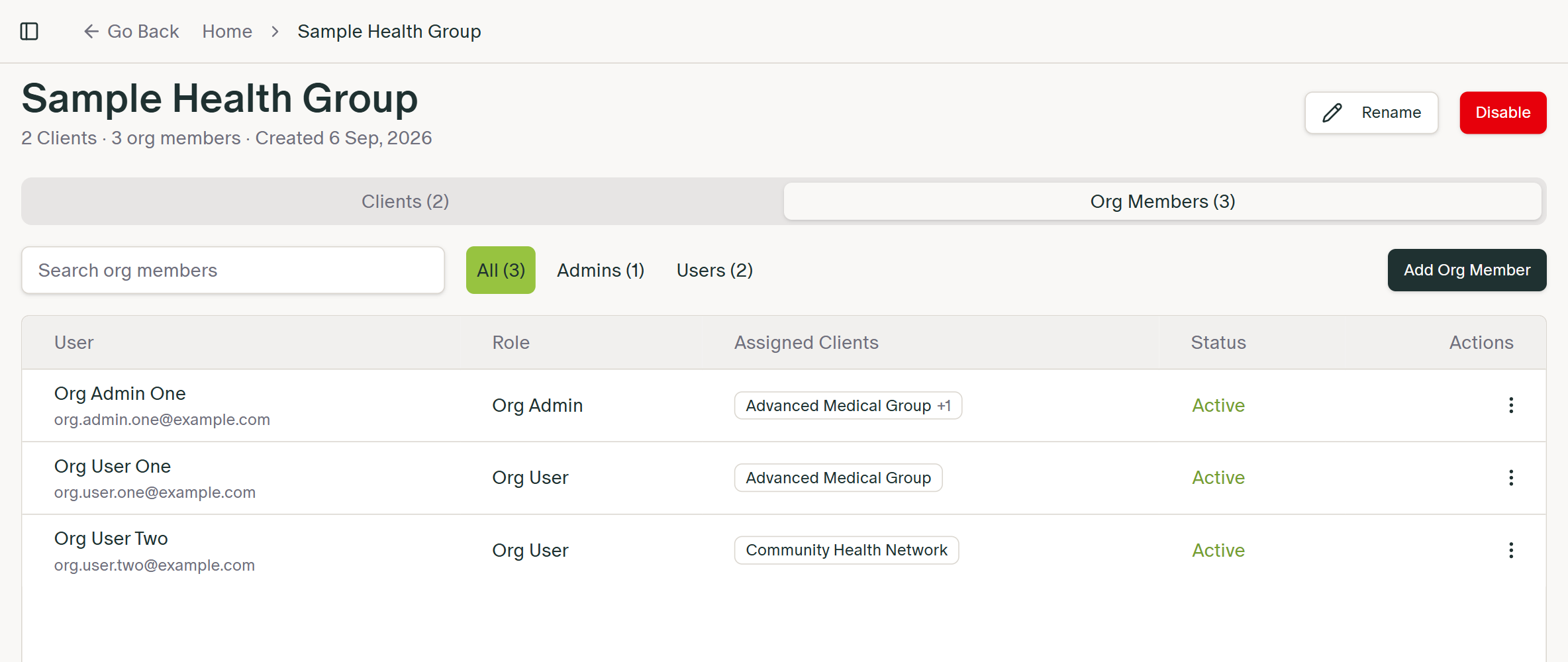
What you will see
Org Admins work with client-admin powers for each client assigned to them, and Org Users book like a Requestor. Both choose the client they are working for under their name. See What each Connexus role can do.
Rename and Disable are at the top of the organization's page. Remove Member in a member's row menu takes away their organization access and returns them to their client role.
Things that most often look wrong, and why:
"This client has no admins to promote". An Org Admin must already be a client admin of the client you picked. Add them as a client admin first, or pick another client.
A member cannot see a location. It is not assigned to them. Use Assign Clients.
Available since March 2026. Org Members since Release 08.20.2026.
Last updated 16 October 2026