
Who this is for and what it does
Platform Admins use this when a client wants its call data every day without asking for it. Connexus runs a Call Basics report for the client each day covering yesterday's calls. It appears in the Reports section and is emailed to the recipients you add.
Before you start
You need the Platform Admin role.
The client needs a time zone. A client with no time zone has its scheduled reports skipped. See "Set a client's time zone".
Have the recipients' email addresses, and check that the client has agreed who receives its data.
Steps
Open Clients, open the client, and select Settings.
Under Reporting, turn on Daily Call Basics Report.
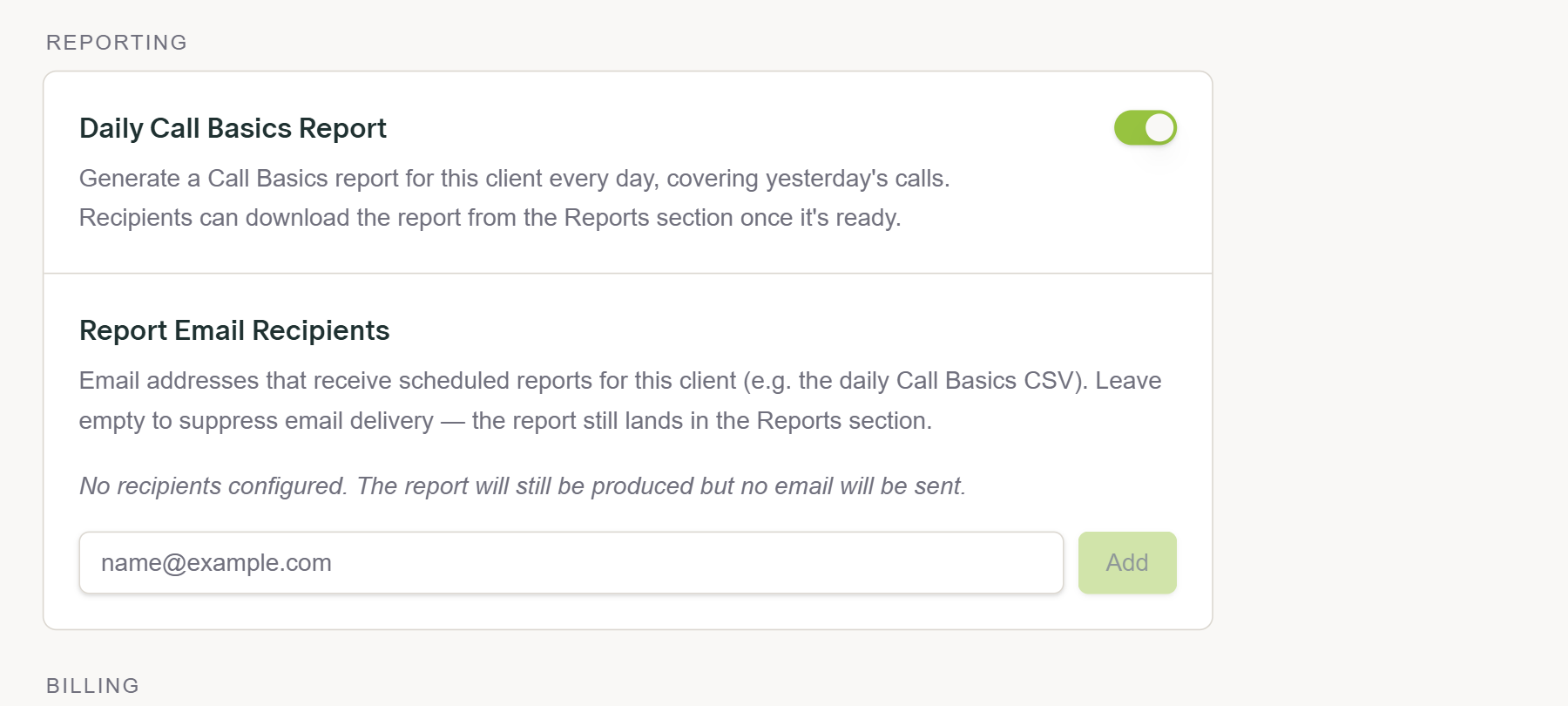
Under Report Email Recipients, type an email address and select Add. Repeat for each recipient, up to 50.
To stop the emails but keep the daily report in Reports, remove every recipient. To stop the report, turn Daily Call Basics Report off.
What you will see
Each change saves at once, with no confirmation message. The recipients are listed under Report Email Recipients.
Things that most often look wrong, and why:
"Enter a valid email address". Check the address for typos.
"That email is already in the list". The address is already a recipient.
"Failed to update client setting". The change did not save. Try again.
No daily report appears. Check that the client has a time zone set.
Nobody receives the email. No recipients are listed. The report still appears in Reports.
Available since March 2026
Last updated 14 October 2026